
HostGator Web Hosting Help
How To Disable CloudFlare - CloudFlare Guide
Disabling CloudFlare
- Click the CloudFlare icon, located in the Domains section of your control panel.

- Scroll to the bottom of the page.
- Choose your domain name from the dropdown menu.
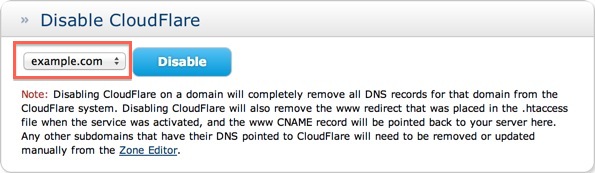
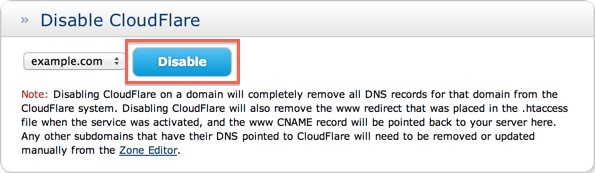
- Click the Disable button to disable CloudFlare.



 bookmark
 share
 E-mail
 Twitter
 Google Bookmarks
 Facebook
 MySpace
 Digg
 Reddit
 Delicious
 LinkedIn
 StumbleUpon
Recommended Help Content
This article explains the name server requirement for using CloudFlare.
How to manage CloudFlare on your HostGator account.
What is required to modify Domain Privacy for a .UK domain.
Related Help Content
Maintaining your domain registration and hosting services within the same account allows you to manage both services with only one login password, making it easier for you to stay on top of everything related to your website. This article explains the process to transfer your domain to [% provinfo.n
As the registrar, we will assist in the following domain dispute, providing the specific criteria is met. The domain has been moved without the domain owner's consent by means of the password or EPP c
Knowledgebase Article
 426,738 views
 tags: dispute domain epp icann moved owners ownership permission policy proof
 426,738 views
 tags: dispute domain epp icann moved owners ownership permission policy proof
Once I Register a Domain, How Long Does it Take to Become Active?
Transfer Domain Registration: When a domain registration is transferred to us, we must register the domain name for a minimum of one (1) year. We only accept registrations for the .com, .net, .org, .
The WHOIS database shows my personal information for my .us domain names. How do I get privacy for the .us domain?
This article explains how to deactivate, change or delete themes and plugins on a WordPress site without the dashboard.
Knowledgebase Article
347,630 views
tags: access dashboard deactivate disable plugin plugins theme themes wordpress
347,630 views
tags: access dashboard deactivate disable plugin plugins theme themes wordpress
This article explains what happens after a domain expires and how domain registration can be renewed.
I do not want to see addon.maindomain.com. How do I do that?
Knowledgebase Article
379,435 views
tags: accessible addon directory domain folders hidden htaccess inaccessible primary secondary
379,435 views
tags: accessible addon directory domain folders hidden htaccess inaccessible primary secondary